
Most of what goes wrong with AI agents in production goes wrong at the same moment: when the agent does something. It books a visit, opens a ticket, updates a contact, and then tells the customer about it.
The doing and the telling are where trust is won or lost. So in a Myna agent, they’re two completely separate jobs.
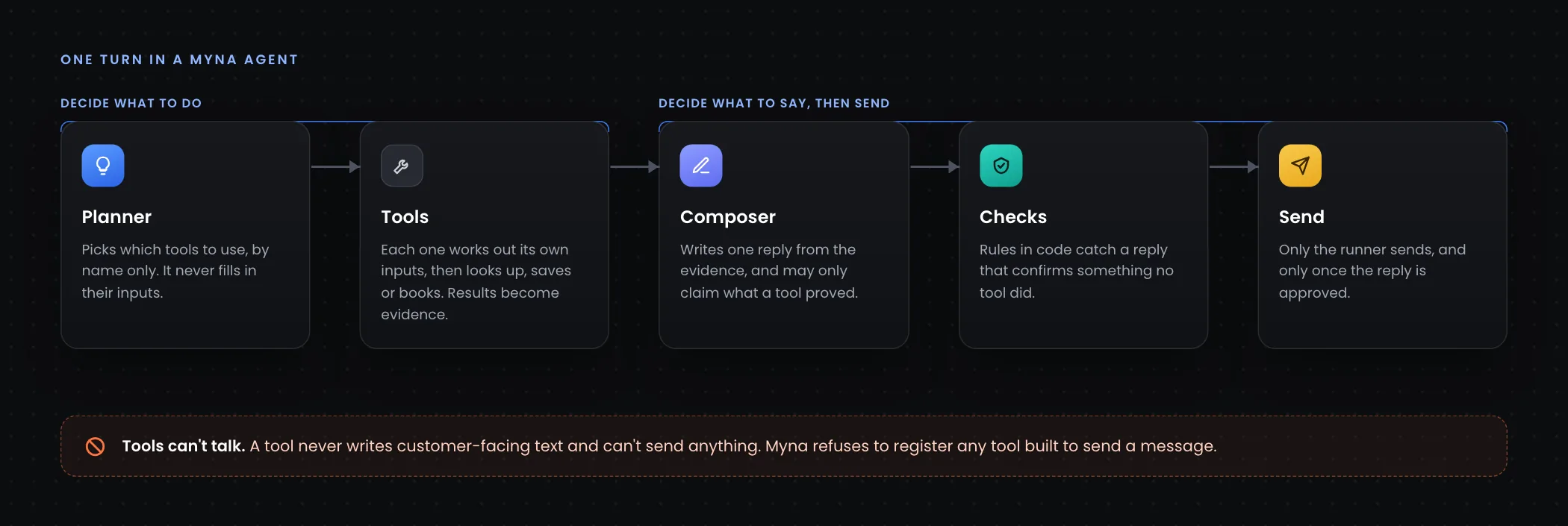
- Tools decide what to do. They look things up, save answers, book, move visits, open tickets.
- The composer decides what to say. It writes one reply from what the tools found.
A tool never writes a word the customer will see, and it can never send anything. Here’s how that works, and why it matters.
Tools can’t talk
Every agent framework tells you not to let tools send messages. Most leave it as a convention. In Myna it’s a rule the platform enforces: the tool registry refuses to register any tool built to send a message.
That’s why features that feel like sending work differently under the hood. Send Call to Action and Send GIF don’t send anything. They return a link, a phone number or a GIF as evidence, and the runner delivers it with the reply once the reply has been approved.
The result is one place where messages leave the system, and it comes after every check.
The planner names a tool. The tool builds its own inputs.
On each turn, a planning loop decides which tools to use. It does that by name only. It sees each tool as a capability with a written policy, not a form to fill in, and it’s told not to fill in arguments at all.
Each tool then works out its own inputs from the conversation. Schedule Appointment pulls the time the customer agreed to. Update Contact pulls the fields worth saving, and a service, not the model, decides what may actually be written.
Separating choosing a tool from building its inputs has two benefits. Each tool can extract exactly what it needs, carefully, without the planner juggling every tool’s fields at once. And the first routing decision doesn’t even need to be made by a language model.
Which tools a turn can use
Not every tool should be available on every turn. Myna decides in layers:
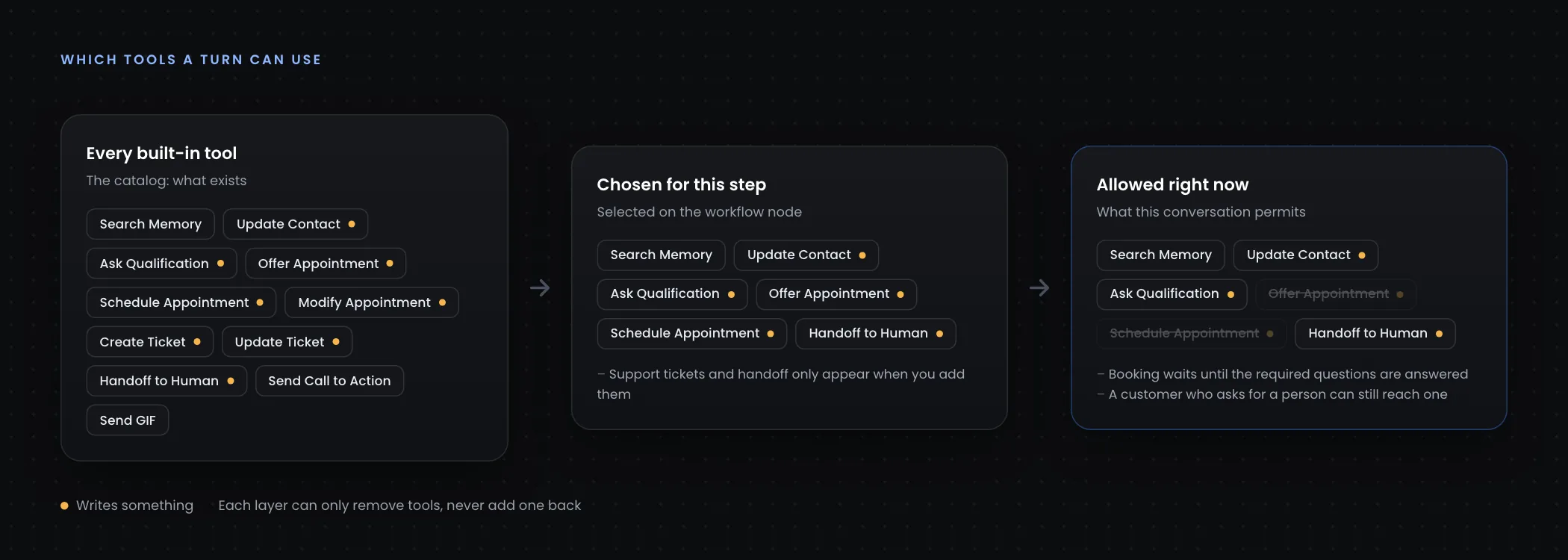
- The catalog says what exists.
- The workflow node says which of those this step may use. Leaving the selection empty means no tools, not all of them. Support tickets and human handoff never appear unless you add them.
- The conversation’s state removes anything that doesn’t apply yet.
That third layer is where a lot of good behaviour comes from:
- While a required qualification question is unanswered, booking and tickets are held back, and the agent is told what it’s waiting on. A customer who asks for a person can still reach one.
- An agent can’t book a second visit when one is already upcoming, and can’t move a visit that doesn’t exist.
- Contacts outside the service area don’t get offered appointments.
The important rule: each layer can only remove tools. None can add one back.
The list also updates during a turn. When a tool changes something, the agent refreshes its view of the conversation before the next step. So the moment Update Contact saves the last qualification answer, Offer Appointment becomes available, in the same turn.
One write per step, enforced twice
Tools that only read, like Search Memory, can safely run side by side. Tools that change something can’t.
So in any single step, the planning loop keeps only the first tool that writes something and drops the rest. Then the executor, the last checkpoint before a tool actually runs, enforces the same rule again: reads run first, then one write, and a batch with two different writes is rejected outright.
The executor checks every call, in order:
- Is the tool known, and enabled for this turn? If not, it’s refused. That includes read-only tools. The executor fails closed.
- Has this exact call already succeeded this turn? Then it returns the earlier result instead of running twice. Every tool that writes is protected this way, with no opt-out.
- Are the inputs valid? Does it finish within its time limit? Is its output valid?
Every outcome is recorded, so any turn can be traced afterwards.
A failed booking can’t become “you’re all set”
The most damaging thing an agent can do is confirm something that didn’t happen. “You’re booked for Thursday,” when the booking failed.
Myna defends against this in two ways.
First, some tools are marked critical, like booking, rescheduling and handing off to a person. If one fails, the failure is passed to the composer, under a plain rule: never claim something happened unless a tool result proves it.
Second, because a rule in a prompt is still a request, there’s a deterministic check in code. It looks for confirmation language that the evidence doesn’t support, and replaces the reply with a safe one: “I wasn’t able to confirm the scheduling details just now. Sorry about that.” That check is plain code, not a second model’s opinion.
Guards come from real conversations
Some rules come from reading real traces. In one, an agent opened a support ticket and then, in the same turn, handed a routine refund over to a person. Nobody had asked for a human.
So Myna now refuses a handoff when a ticket was already created earlier in the same turn and the customer didn’t ask for a person. It’s a small rule, but it’s the kind you only find by watching what agents actually do.
One policy, read by both sides
Every tool has one written policy: what it does, when to use it and when not to, and what the reply may claim afterwards. The planner reads it to decide whether to call the tool. The composer reads the same text, word for word, to decide what it’s allowed to say. They can never drift apart.
You can override a tool’s policy on any node in Workflow Studio. Two details make that safe:
- A policy never names another tool, because that tool might not be enabled on a given node. When two tools interact, like offering a time versus booking one, the guidance is added only when both are on.
- Fixes still reach you. Myna keeps a fingerprint of every default policy it has ever shipped. If your saved policy matches an old default, you never edited it, so it gets our improvements. If you changed it, your version is left alone.
Why build it this way
None of this is about making the model smarter. It’s about making sure the model’s mistakes can’t reach the customer:
- Tools can’t talk, so there’s one place where messages leave.
- Layers only remove tools, so a misconfiguration fails closed.
- One write per step, checked twice, so actions don’t collide.
- Truth checks in code, so a failure can’t be reported as a success.
That’s what lets you hand an agent real tools, a calendar, a CRM or a support queue, and still trust what it tells your customers. If you want the broader picture, start with what an agent harness is, or see how pre-gates and post-gates wrap every turn.