
If you’ve heard “AI agent” a hundred times this year and still aren’t sure what one would actually do for your business, this post is for you.
And there’s no better way to get started with AI agents than getting to know Myna: a simple way to build them, and to see for yourself what they can do for your business.
In this post, I’ll walk you through what Myna is, the jobs its agents can take on, where to start, how to take an agent from draft to live, and why it’s safe to let one talk to your customers.
What is Myna?
In customer experience, the path to success is built on two essential pillars: fast, personal conversations and reliable follow-through. However, achieving both has long been a time-consuming challenge, requiring large teams, long hours and a patchwork of disconnected tools.
Myna is an easy-to-use agent-building platform that brings together intelligent conversations and automated task handling in one unified workspace. Whether you run a small clinic or manage dozens of client accounts at an agency, you can set up a personalized agent that fits how your business works, without writing a single line of code.
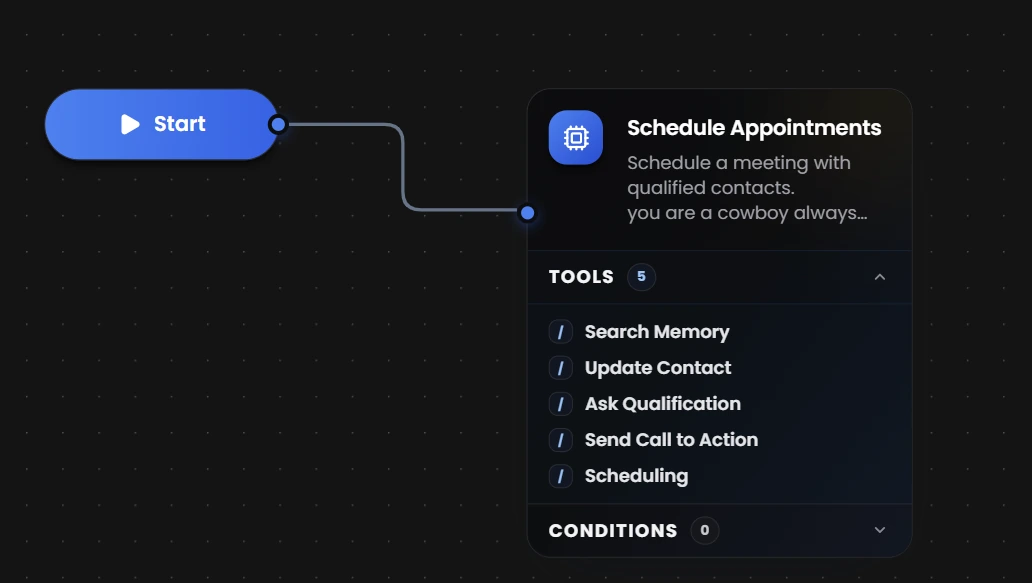
Your agent works on the channels your customers already use, including SMS, WhatsApp, webchat and email. It answers their questions, collects all the details you need and takes care of the work that follows, such as booking appointments in your calendar, updating contact records and opening support tickets. It only confirms an action to a customer once it is done, so what your customers are told is always accurate. If a request calls for a human, it passes the conversation to your team with the context already in place.
You stay in control of what your agent can access and do, from the tools it uses to the contact fields it can read or edit. Once it’s set up, Myna keeps it running at any hour.
What can a Myna agent do?
These are the jobs businesses most often give to a Myna agent. Each one can be handled by a single agent or split across several.
- Book appointments: Ask your qualifying questions, offer open times from your calendars, book the appointment and handle reschedules.
- Resolve support requests: Answer from your help content and policies, open and update tickets, and escalate when a person is needed.
- Run your front desk: Answers everyday questions about your hours, services, prices and location, using what you add to Memory Hub.
- Handle customer intake: Gathers the details you need, such as a name, email or address, and saves them to the contact record.
- Follow up with customers: Checks back in with customers who stopped replying, so no conversation is left hanging.
- GoHighLevel integration: Sync contacts, conversations, and appointments bidirectionally with your GoHighLevel CRM.
Have no idea where to start?
No problem! Myna comes with ready-made templates, called engines, for the jobs businesses need most. Each engine already includes the instructions, tools and policies its job requires, so you only need to pick one, add your business details and your agent is ready to work. Nothing is locked in: you can change any part of an engine after you select it.
| Engine | What it does |
|---|---|
| Schedule Appointments | Asks the questions you require, checks availability across your calendars and books the appointment. Booking stays locked until every required question is answered. |
| Customer Service | Answers from your articles and policies, collects the details of each request, creates and updates tickets, and hands off to your team when needed. |
| Custom Engine | Starts from a blank canvas, so you set up the instructions, tools and policies yourself for any job you have in mind. |
| Collect Feedback | Coming soon. Follows up after a visit or purchase to gather ratings and comments. |
| Collect Payment | Coming soon. Sends payment links for deposits and invoices and follows up until they are paid. |
| Check-Out Assistant | Coming soon. Helps shoppers find the right product and sends them a ready-to-pay checkout. |
Tip: Not sure which one to pick? If your agent will mostly book appointments, start with Schedule Appointments. If it will mostly help customers with questions and problems, start with Customer Service.
Community Engines are coming soon. You will be able to explore and download engines built and shared by other Myna users.
Picked an engine? Here’s what comes next
Once you’ve chosen an engine, three more steps take your agent from draft to talking with real customers.
1. Equip your agent
Three settings decide what your agent knows, how it writes and which customer details it can use:
- Memory Hub: Build knowledge bases from text you write, pages imported from your website, documents such as PDFs, Word files and spreadsheets, and structured data like price lists. During a conversation, your agent searches Memory Hub and only uses results that are relevant enough to the question.
- Personas: Give your agent a name, a backstory and a personality set across six traits: humor, formality, empathy, creativity, enthusiasm and persuasiveness. You can also control its writing style, including punctuation, slang and emoji. One persona can be used by several agents.
- Contact fields: For each field on a contact record, choose whether your agent can see it, see and edit it, or not access it at all.
Tip: Upload price lists and spec sheets as structured data. Memory Hub stores them as tables, so your agent can look up exact prices and values instead of guessing.
2. Connect your channels
Choose where your agent talks to customers, such as SMS, WhatsApp, webchat or email, and set how it replies on each one.
| Setting | What it does |
|---|---|
| Intro message | The first message your agent sends when it starts a conversation |
| Opt-in and AI disclosure | An optional message that asks for consent or tells people they are talking with an AI |
| Response delay | How long your agent waits before replying, from 3 to 60 seconds or a custom value |
| Split texting | Sends a longer reply as separate texts |
| Agent reply schedule | When your agent replies to inbound messages. Outside the schedule it stays quiet. The default is 24/7 |
Myna adapts each reply to the channel it is sent on, with per-channel compliance, warm-up, daily limits and throttles built in. These settings control how your agent replies.
Warning: Whether your agent discloses that it is an AI is your decision. Check the messaging and disclosure rules where you operate before your agent contacts anyone.
3. Test and publish
Try your agent with Simulate and Test Agent while it is still a draft, then click Publish to put it live.
Follow the full step-by-step guide to set up and publish your first agent: Launch Your First Agent
Can you trust our agents with customers?
Yes! Every Myna agent runs on the Myna Agent Runtime, a production agent harness with bounded tool-calling, typed contracts and policy gates.
- Plan, then speak: Tool work and the reply your customer sees are separate stages. A dedicated composer writes every reply from confirmed results.
- Tools with contracts: Every action has typed inputs and outputs, policy rules and throttling, so side effects are explicit and safe to run in production.
- Pre-gates: Opt-outs, human takeovers, after-hours sends and usage caps are stopped before the AI model runs.
- Post-gates: False booking claims and prompt leakage are caught with evidence before a reply is sent.
Read more in A Look Inside the Agent Harness.
What else is in your workspace?
Besides your agents, the Myna sidebar gives you everything you need to run the work they do. Each section has its own page in our documentation.
| Section | What it’s for |
|---|---|
| Dashboard | Real-time analytics for your appointments, tickets, customer satisfaction and reputation |
| Radar | Find businesses and people to reach out to |
| Agents | Create, edit, test and publish your agents |
| Contacts | The people your agents talk to and the details saved about them |
| Conversations | Every conversation your agents have, across all your channels |
| Calendars | The calendars your agents check and book appointments into |
| Tickets | Support tickets your agents create and update |
| Reputation | Keep track of your business reputation |
| Personas | The characters and writing styles your agents use |
| Memory Hub | Your knowledge bases, documents and structured data in one place |
| Playground | Test your agents and save corrections they learn from |
Who is Myna for?
Myna is used across industries where customer conversations drive the business.
| Industry | Common uses |
|---|---|
| Home services | Database reactivation, SMS follow-ups, lead qualification, scheduling across multiple job calendars |
| Health and wellness | Reception, appointment scheduling, rescheduling and confirmations |
| Retail and e-commerce | Webchat, product and order questions, abandoned cart campaigns |
| Salons and spas | Multiple bookings, WhatsApp, follow-ups and reminders |
| Restaurants | Reservations, questions about hours and menus, SMS campaigns |
| Financial services | Lead qualification, database reactivation, booking consultations |
| Agencies and coaches | White-labeled agents across client accounts, prospecting, scaling campaigns |
Managing more than one business?
Give each one its own workspace. Everything you do in Myna happens inside a workspace, which holds your agents, contacts, conversations and knowledge. You can switch between your workspaces from the menu at the top of the sidebar.
Running Myna for clients? Agencies can white-label the platform, resell agents under their own brand, and control subscription costs, usage limits and rebilling. See the Agency section for details.
The takeaway
Myna gives your business an agent that holds the conversation and finishes the work that comes after it, inside rules you control. Pick an engine, equip it, connect your channels and test it before your customers ever see it.
Next in this series, I break down what AI agents can do and why they are more than ChatGPT, then take a look inside the agent harness to follow a single message from start to finish.
Myna is available at app.myna.cx. Start building for free and launch your first agent in minutes.